This skill is also called time management. For many people, this still sounds like something incomprehensible or even fantastic, although in fact there is nothing special about it.
The latter is also worth explaining.
When work is done chaotically, it wastes a lot of extra effort, sometimes you do the same thing, or you have to "jump" from one task to another. Time management has been actively used in the IT industry, but in fact, it is an important skill for everyone. But today, we are going to talk about time management for developers. We will talk about the basic principles, give advice to beginners, and recommend tools that will greatly simplify this process.
The principles of time management and how it works
Of course, like any other field of activity, time management has its own methods. In fact, there are a lot of them and we won't try to cover everything so that you finish reading this text the next morning. We will reduce everything to a commonly understood one so that you can find out for yourself the principles on which time management is based and start using them accordingly.
Using proven techniques (most likely, you will not do this in a "pure" form, but in a certain combination) will definitely appeal to you. Believe me, we've tried it!
Yes, you will be constantly distracted by something, there will not be enough hours in a day, but if you persistently and consistently implement your plans, breaking the long way to the goal into stages (months and weeks, and weeks into individual days), you will definitely achieve your goal and systematise your work. It is important that the result of each day is another step towards success. We assure you that over time, everything will be automated.
There will still be 24 hours in a day, 7 of which should be spent sleeping, and you must rest. Set aside about 5 more hours for communication with family and friends, personal affairs, and sports. If all this is in your calendar, if such a schedule is functional and you normally meet all deadlines, then time management is already working for you. If not, you need to change. Next, let's talk about the various methods that are most popular in the community and their application.
Asking yourself questions as a way to self-organisation
First, let's start with a simple one. Have you ever heard of the Eisenhower matrix? Perhaps you have, because it is often discussed in various trainings, courses, etc. If not, then study it according to the simple diagram below:
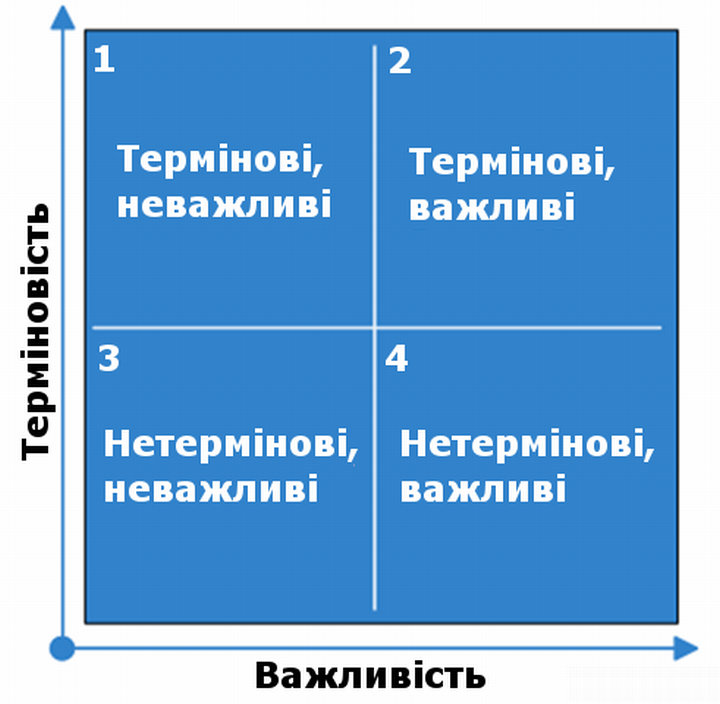
To use it, first write down the entire list of project tasks, and then answer the following questions for each item:
- This is important (yes/no)
- This is urgent (yes/no)
According to the scheme above, distribute all tasks in each of the four squares. This way, you'll immediately identify those tasks that shouldn't bother you at all.
To find a balance between tasks, use a simple rule. In a normal situation, do the tasks in order of priority in the squares: 1"2"3"4. If you're on fire, then move on to the 1"3"2"4 scheme, but don't overuse it."
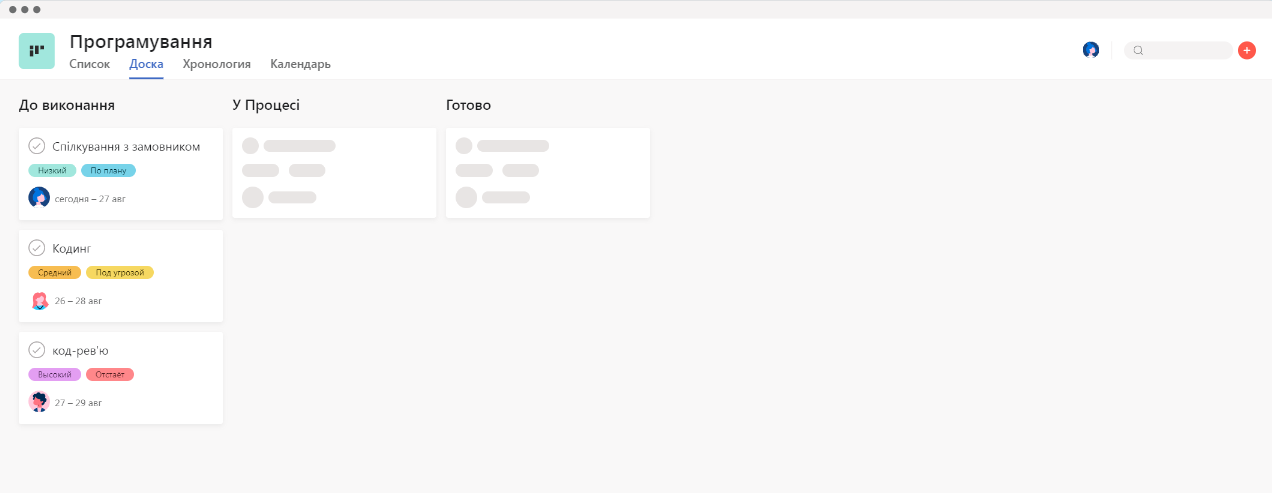
If you work in a team, you can use a kanban with different columns, such as "To Do", "In Progress", and "Completed", as a variation of the matrix. But you can also introduce additional ones depending on your needs, this should be decided individually according to the project.
Time management and the tomato
The tomato method was invented by an Italian gentleman, but let's not talk about him, but rather about the method itself.It consists in the fact that one tomato is 25 minutes of your working time + 5 minutes for rest. Accordingly, your working day is 14 tomatoes.

The essence of the method is simple. You set a timer that clearly defines working hours and rest, and when the bell rings, you quickly move from one stage to the next, without hesitation and without this "I'll finish a little more" or "I'll finish smoking and get back to work."
You say it's not possible? In fact, you can't, but you should, because:
- Working in a flow, you don't see the task completely, and sometimes you need to look at your project from a different angle to benefit from it;
- If you miss a break, you will also disrupt the rhythm of your work, and this is the main advantage of the method. After two or three weeks of practice, if you follow the conditions, the "flow" state will be activated as soon as your ears hear the timer ticking;
- and finally, the obvious - without a break, you will get tired very quickly and work with low productivity for some time before you finally allow yourself to rest.
Time blocking
This is another time management method, which means that you "book" some hours for certain tasks in advance, and do not violate these plans under any circumstances. This is good for planning your activities and leisure time, but not for working hours.
Alternatively, you can "book" time to spend with your family, play sports, meet friends, etc. It is best to do this on Sunday, planning for the week ahead. As for the work itself, this is unlikely to help, because your to-do list will certainly be disturbed, you cannot foresee all the problems and challenges that may be associated with the development process.
The Frog Method
Let's finish the discussion of methods with another original approach with an interesting name. Let us warn you right away: You definitely don't need to have frogs, but you will have to "eat a frog", albeit figuratively. The method is as follows.

You create a list of tasks for your project and determine what you will do today. It is important to approach this realistically and without exaggeration. Next, you determine what will be your "frog", that is, the most difficult and unpleasant task, for example, some difficult section, etc. And that's what you do first, and only then do other things.
Experience with the method shows that once you "eat the frog", i.e. complete the most difficult task, you will feel better for the rest of the day, and therefore be more productive and successfully cope with the rest of your plans.
Apps that can help with time management
There are many such apps, but let's name the most popular ones and give a brief description of each of them. Everyone will be able to choose which ones will be useful in their work. However, looking ahead, we can say that you, as a developer, will most likely need several programs at once and use them in combination.
So, all the programs can be summarised into the following groups:
- Task tracking software
These are programs that help you organise tasks and projects by allowing you to create lists, set deadlines and priorities, track progress, etc.
The former is a handy tool that allows you to create boards for different projects and add cards for each task. Trello is a great time management tool for developers because it makes it easy to prioritise and collaborate on tasks with your team (if you have one).
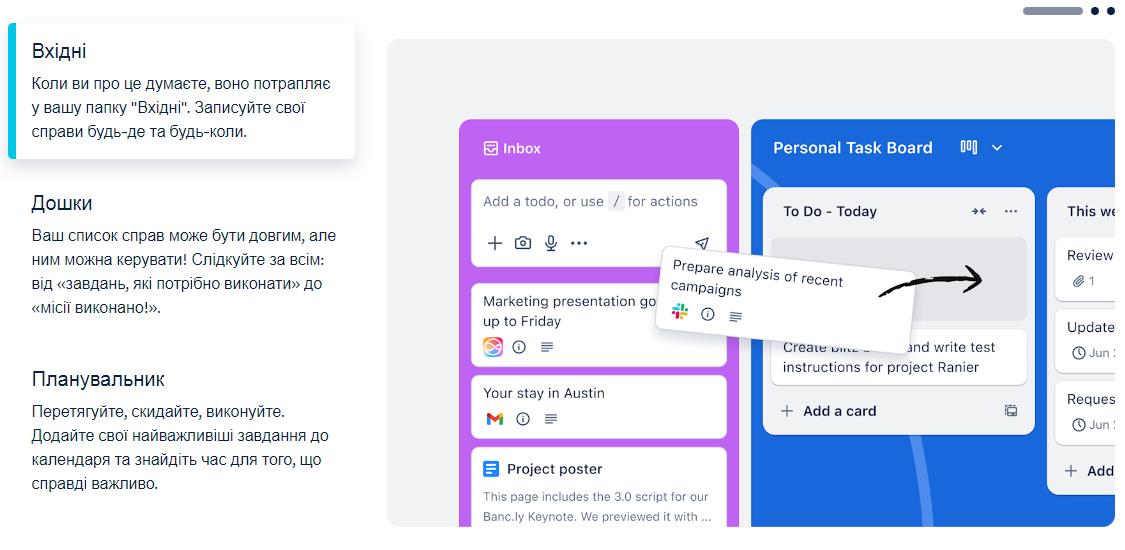
As for Asana, it's a project management tool that makes it easy to keep track of tasks and collaborate with your team. Asana is great for developers who value data privacy and need a more streamlined approach to time management.
- Calendar management apps.
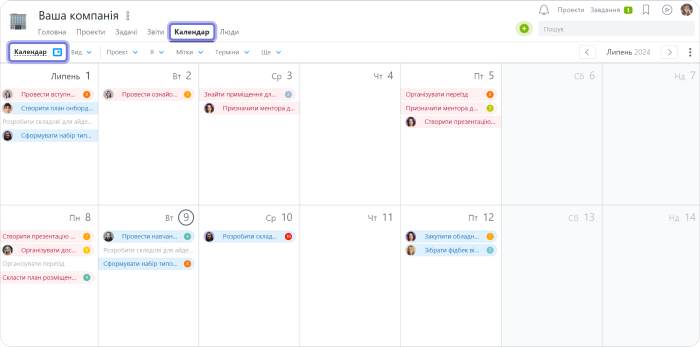
These are designed to give you an overview of your schedule so that you can see at a glance what's planned for the next few weeks or months. This way, you can make timely and easy changes if necessary.
That is, you're actually programming your life ahead of time, and it helps you to be more organised and productive.Examples of such apps include Google Calendar, Cron, and Motion, and when it's part of a larger app like Worksection.
- Productivity apps
And finally, apps designed specifically to improve productivity by helping users focus on their work better through various methods, such as breaking large tasks into smaller parts. Or, they can remind you when project tasks have been idle for too long and you've forgotten about them, or at least been "distracted". The latter include Focus Booster and RescueTime.
The first app helps developers maintain focus on tasks by blocking distractions. It provides an easy way to set reminders and track your development progress.
As for RescueTime, it is a time tracking software that monitors your computer or laptop usage. RescueTime provides analytical data and recommendations on how to better allocate your time as a software developer. Toggl, for example, is a similar app.
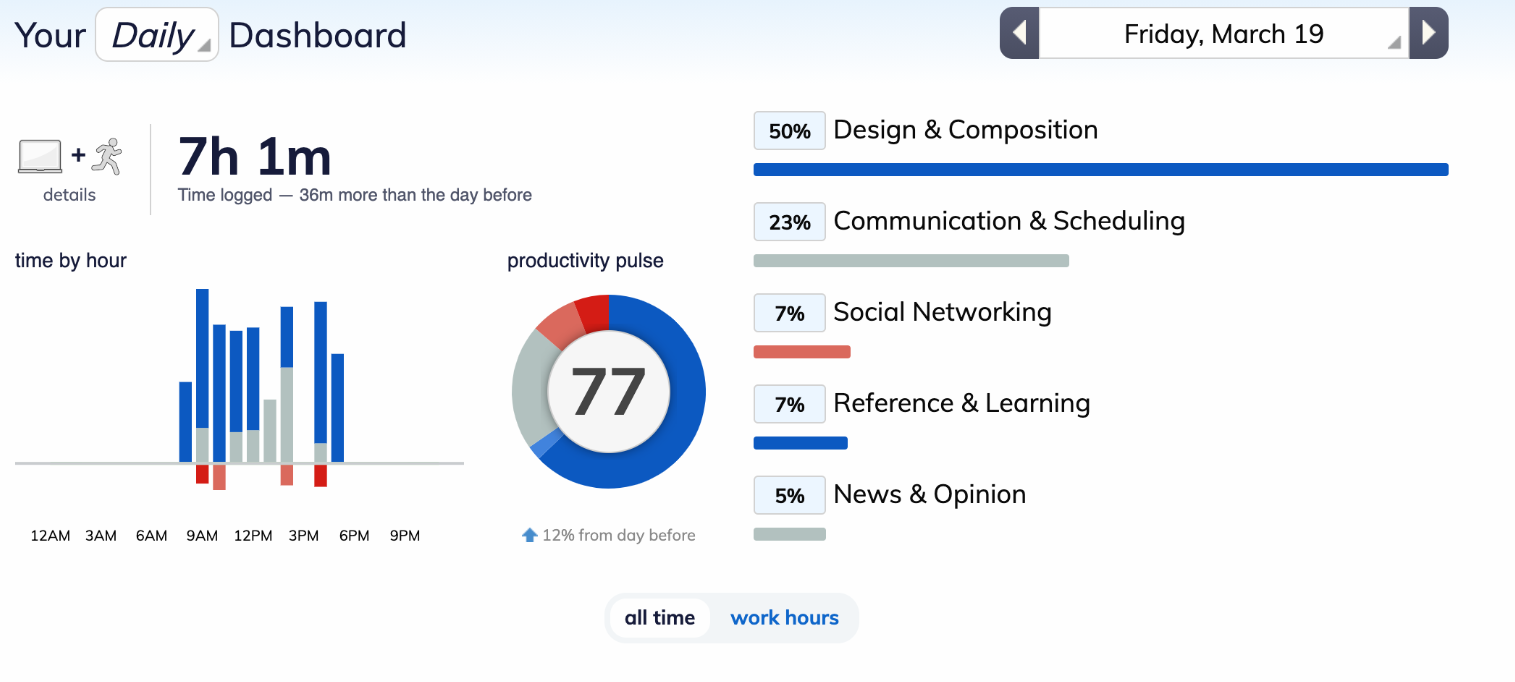
As you can see on the screenshot, the app shows how much time you spent at the computer and what you spent it on - work, communication, social media, studying, or reading news. It also measures general statistics about you - how long you sit in front of the monitor and how you work over a period of time.
Typical mistakes in time management and how to avoid them
We have already talked about some of this, so let's go through it briefly and point by point.
- Don't overwork, clearly define your working hours, and don't work a minute more. It's harmful, pointless and counterproductive, and will only make you more tired. Set working hours are the first step to success, for example, from 9 a.m. to 5 p.m. And don't forget about breaks! In more modern terms, excessive multitasking is evil. Focus on one thing and do it until it's done. Don't take on everything at once, you're not Gaius Julius Caesar, and remember how he ended up. Make a plan using a matrix or planner and then stick to it as closely as possible. Disrupting plans or chaos in your work is the way to overwork and miss all the deadlines with all the consequences.
- When working on something difficult, it is better to turn off all notifications, block social media, etc. Don't let anything distract you. You know how it is - you're busy, you're working, and you get a message saying "Your task hasn't passed the test, there's a bug", and that's it, you're at a crossroads and as a result, you don't really do both tasks. This shouldn't be the case, first one, then the other.
- Don't devote more than half of your time to work. Rest and plan time for rest, because burnout is a very bad thing and it is better not to get acquainted with it.
You may think that all this is very difficult and it is very difficult to get used to it. But in fact, you think so because you haven't tried it yet. Try it and work like this for at least a few days, or better yet, a week or two. You will see how everything becomes easier and clearer.